
Client Reports: Your Investment Resources

[Generated with Gemini]
Fernwood Real Estate Investment Group provides clients with two key reports: the Investor Tool and the Property Report.
The two reports are compared below.
| Feature | Investor Tool | Property Report |
|---|---|---|
| Purpose | A list of candidate investment properties. | Provides analysis of a single, property. |
| Data Source | Mostly MLS data plus our software generated analytics. ⚠️ We take no responsibility for the accuracy of MLS data. | MLS data plus proprietary analysis, videos, renovation estimates, and financial projections. ⚠️ We take no responsibility for the accuracy of MLS data. |
| Validation | Properties are only candidates; most have not been validated. Only the property rows that are shaded in green have been at least partially validated. | Partially to fully validated as it moves through the evaluation process. |
| Frequency | Sent twice a week to all active clients. | Generated on demand for specific properties of interest. |
| Availability | All active clients receive it. | Only available for properties that have been flagged for deeper review (indicated by the green row in the Investor Tool). |
The Investor Tool
The Investor Tool is your initial list of potential properties. We send this list to all active clients twice a week.
Here is an example of an Investor Tool.
🚨 Important: The properties listed in the Investor Tool are candidates; they may not have been validated by our team. Rows shaded green have been at least partially validated. For properties with green rows, you’ll find a link to the Property Report in the right panel under the MLS number and address.
The Investor Tool has three main sections, as illustrated below.
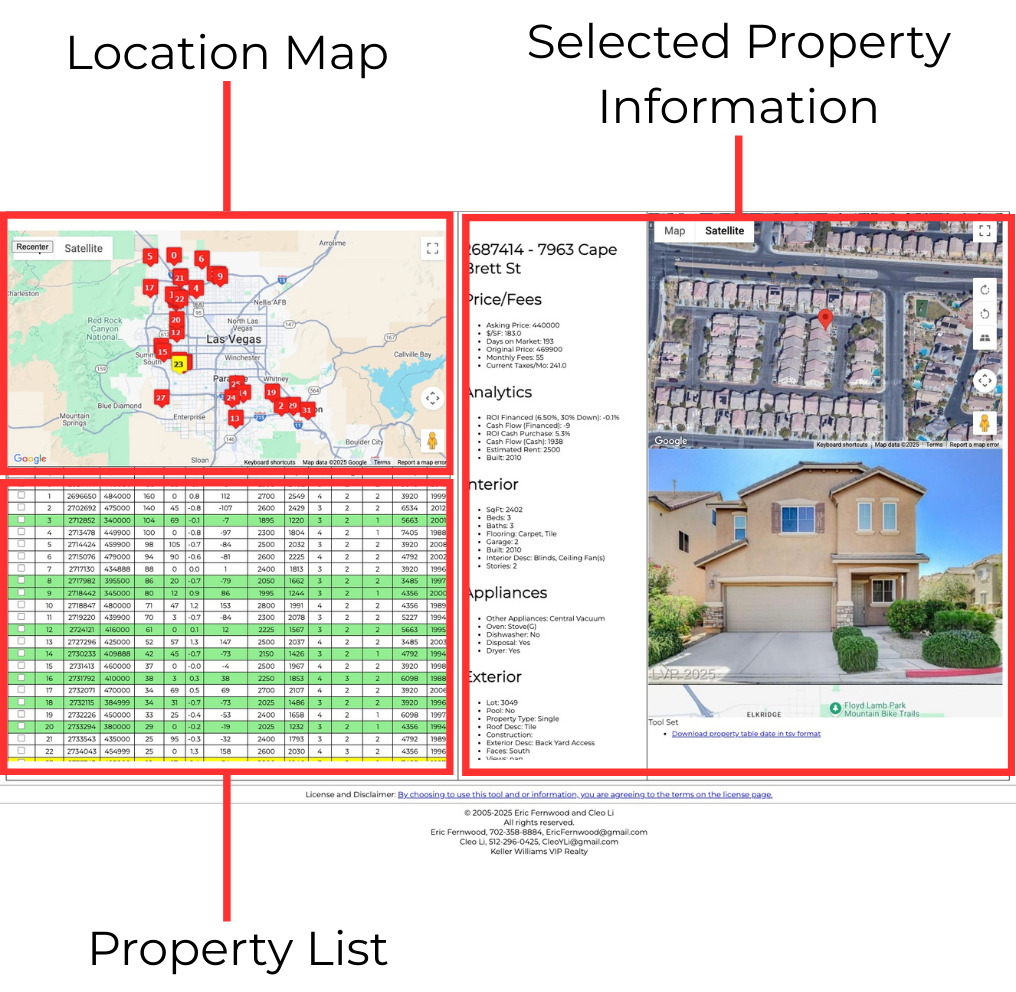
Location Map
Use the map to visualize the property locations. You can select a property by clicking its map marker or by clicking a row in the Property List table. There is a button in the upper-left to recenter the map, if needed.
Property List
This table summarizes all the candidate properties.
- When you click a row, the appropriate map marker will turn yellow, and the Selected Property Information section will update with the property’s details. ⚠️ Most of the data comes from the MLS, and we take no responsibility for the accuracy of MLS data.
- Property Report Available: If a row is shaded green, a Property Report exists for that property. Click the green row to see the link to the Property Report just below the address.
- You can sort the table by clicking any of the column headers.
Selected Property Information
This section displays the MLS (Multiple Listing Service) details for the property you select.
- If a Property Report is available (green row), you will find a link to it right below the MLS number and address.
- ⚠️ The data shown comes largely from the MLS (except for the Analytics) and we take no responsibility for the accuracy of MLS data.
- The photos shown were uploaded by the listing agent and may or may not depict the current condition of the property.
- The rent estimate shown is generated by software we developed and does not reflect the condition of the property. Here’s an article explaining why we reevaluate rent at least four times: How We Project Rents That Actually Materialize.
The Property Report
The Property Report provides detailed information for a single property.
Here is a sample Property Report.
Information is added to and refined as the property moves through our validation process.
Report Sections
Below is a description of each section of the Property Report, starting from the top and working down. The section title below is the blue title bar on each section.
Index
- The MLS number and the street address.
- Quick Links: These links let you quickly jump to different sections.
MLS Main Photo and Location Map
- The photo was uploaded by the listing agent and may or may not reflect the current condition of the property.
Video Link
If we’ve visited the property, we take a video walkthrough and include the link here. Depending on where the property is in our evaluation process, a video may not be available yet.
Estimated Return
This section shows the estimated rent and associated returns for different renovation options. For most properties, the property manager will provide a minimum and full renovation option with their corresponding rent ranges. We will finalize the renovation list once we have an accepted offer and the inspections are complete.
Multi Year Return
This section contains a spreadsheet with multi-year projections for rent and appreciation. There are three links at the top of this section.
- “The rent and price growth projections are based on a study explained in this article.” This links to our most recent yearly outlook, which explains our basis for rent growth and appreciation.
- “Download Excel File” – This link will download a copy of the spreadsheet shown in this section so you can plug in your actual financing terms and change growth projections or any other variable as you wish.
- Understanding the Multi-Year Spreadsheet -This linked article explains the spreadsheet.
Note: If you are purchasing with cash, check out the spreadsheet section toward the bottom named “Return (Cash).”
Property Summary
This section summarizes key property information. ⚠️ This information comes from the MLS and may not be accurate.
Recent Similar Rentals
This section contains a list of the properties that our software used to estimate the rent. However, the property manager’s opinion on rent is far more accurate.
Recent Similar Sales
This section contains a list of the properties that our software used to estimate the market value. A manual comparable analysis is far more accurate, and will be performed once there is interest in making an offer on the property.
Property Manager Opinion
This section contains the unfiltered property manager opinion.
At the top are the pros and cons of the property. Below that are the recommended renovations to maximize rent and minimize time to rent. At this stage, we focus on creating a complete list of all feasible renovations; we do not consider the cost at this stage.
Note that there are typically two renovation options. One is the minimum renovation to rent the property quickly to our target tenants and minimize the renovation cost. Another is the full renovation list. This list is designed to maximize income and minimize time for rent.
Renovation Estimate
This section contains the estimated cost for each line item and a total. If the property manager’s opinion contained two renovation options, this section will also contain the estimated cost for both options. The final renovation list will be determined in a meeting with you, the property manager, me (Eric Fernwood), and Selena Tsai, who manages all of our renovations.
MLS Photos
These are photos uploaded by the listing agent and may not reflect the property’s current condition. If there’s a discrepancy, trust the video we provided. Use the photos primarily to understand the property’s layout.
Summary
We are always seeking to improve our work products, and I appreciate your feedback and suggestions.